
Гид по связи в поездках
United Arab Emirates eSIM for travel internet
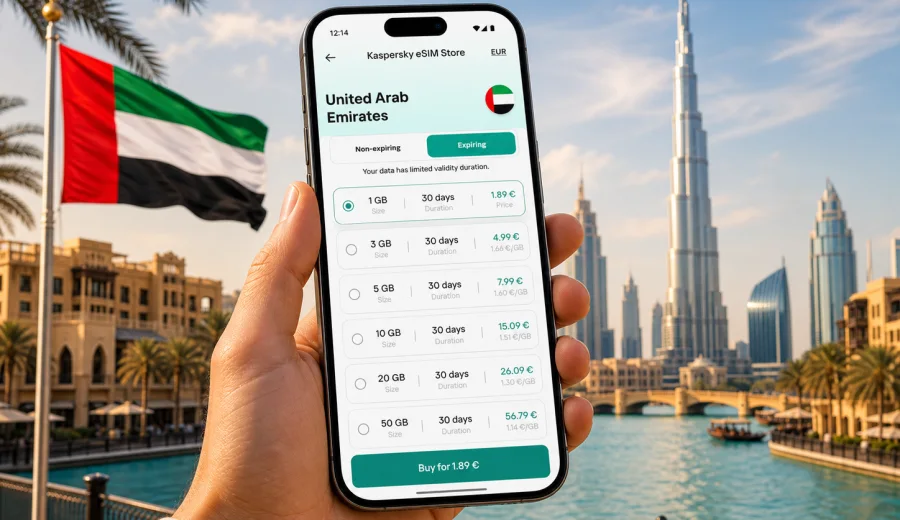
United Arab Emirates eSIM: mobile connection and internet for your trip
If you are planning a trip to the United Arab Emirates, mobile internet is one of the first practical details to prepare. You may need maps from the airport, ride-hailing apps in Dubai or Abu Dhabi, hotel messages, payment confirmations, restaurant bookings, work chats, and quick access to travel documents. A United Arab Emirates eSIM can help you get online without looking for a physical SIM card after arrival.
An eSIM is a digital SIM profile installed on a compatible phone or tablet. For travelers, the main benefit is simple: you can choose a data plan for the destination, install it before your trip or soon after landing, and use mobile internet while keeping your primary SIM in place. Kaspersky eSIM Store is an app and website where you can quickly choose, set up, and activate an eSIM with a suitable data plan for mobile internet during an international trip.
This guide explains how to prepare mobile connection and internet for the United Arab Emirates, what to check before buying an eSIM plan, how to estimate data needs, and how to avoid common setup mistakes.
Why eSIM is useful in the United Arab Emirates
The UAE is a country where many travel tasks are mobile-first. In Dubai, Abu Dhabi, Sharjah, Ras Al Khaimah, and other emirates, you may rely on your phone for airport transfers, navigation across wide urban areas, digital bookings, work calls through messengers, and quick changes to plans. Public Wi-Fi may be available in hotels, malls, airports, and cafes, but it is not always convenient when you are between places.
With an eSIM data plan, you can prepare mobile internet without visiting an offline store, changing a physical SIM card, or waiting until you understand the local purchase process. This is especially helpful in the first hour after landing, when you may need to confirm a taxi pickup, open a map, message your host, or check which terminal exit to use.
An eSIM for the UAE can be useful for:
- short city breaks in Dubai or Abu Dhabi;
- business trips with frequent email, calendar, and messenger use;
- family holidays where several bookings are stored on the phone;
- transit stays that require maps, hotel access, and transport apps;
- remote work days when mobile data is a backup for hotel Wi-Fi;
- multi-emirate routes, for example Dubai, Abu Dhabi, and Ras Al Khaimah.
The main point is not only convenience. A travel eSIM also helps you see the plan conditions in advance: data volume, validity period, destination, and price. That makes it easier to plan your mobile internet before the trip instead of making a rushed decision at the airport.
Quick answer: what should you prepare?
For most travelers, the preparation is straightforward:
- Check that your device supports eSIM and is not locked to a carrier.
- Choose a UAE data plan that matches your trip length and expected data use.
- Install the eSIM while you still have a stable internet connection.
- Keep your primary SIM for calls or SMS if you need it.
- Use the eSIM profile for mobile data after activation.
- Track data use during the trip, especially if you stream video or use hotspot mode.
In simple terms: eSIM is best for mobile internet in the United Arab Emirates, while your usual SIM can remain available for your main number if your phone supports dual SIM settings.
eSIM, roaming, local SIM: practical comparison
Different options can work for different trips. The right choice depends on your device, budget, trip duration, and how much time you want to spend on setup.
| Option | When it can fit | What to check |
|---|---|---|
| Travel eSIM | You want mobile data prepared before or soon after arrival | Device compatibility, plan destination, data volume, validity |
| Standard roaming | You prefer to keep everything with your home mobile carrier | Roaming fees, daily caps, speed limits, included countries |
| Local physical SIM | You want a local SIM card and are ready to buy it in person | Store location, registration process, phone SIM slot, plan terms |
| Public Wi-Fi only | You have very light internet needs and stay mostly in one place | Availability, login requirements, security, coverage between locations |
An eSIM is often the most convenient option for travelers who need mobile data but do not need a local phone number. It does not automatically replace every roaming or local SIM scenario. It is a practical way to prepare internet access for the trip while keeping the setup digital.
How much data do you need in the UAE?
Data use depends on your habits. A weekend in Dubai with maps, messengers, and booking apps may need far less than a two-week trip with video calls and hotspot use. Before choosing a plan, think about the apps you use every day and whether your hotel or apartment will have reliable Wi-Fi.
Here is a practical estimate:
| Travel style | Typical use | Plan approach |
|---|---|---|
| Light | Maps, messaging, email, booking confirmations | Smaller data package for short stays |
| Standard | Maps, social apps, web browsing, photo uploads | Medium data package with enough validity |
| Work-focused | Email, cloud files, video meetings, hotspot backup | Larger data package and careful data tracking |
| Family or group organizer | Navigation, tickets, restaurant searches, shared photos | Medium or larger data package depending on trip length |
| Transit or stopover | Messaging, maps, ride-hailing, hotel check-in | Short-validity package if available |
To reduce unnecessary data use, download offline maps before departure, update apps on Wi-Fi, disable automatic cloud backups on mobile data, and avoid streaming in high resolution unless your plan has enough allowance.
Where mobile internet matters most during a UAE trip
The United Arab Emirates is easy to travel in, but distances, heat, and busy arrival points make reliable mobile internet especially useful. You may need a connection in several common moments.
At the airport
Dubai International Airport, Abu Dhabi Zayed International Airport, and Sharjah International Airport can be busy. Mobile data helps you message a driver, check transfer details, open your hotel address, or confirm a booking reference. If your eSIM is installed in advance, you can switch mobile data to the eSIM profile when the plan is ready to use according to its conditions.
In Dubai
Dubai is spread across areas such as Downtown Dubai, Dubai Marina, Deira, Business Bay, Jumeirah, and Palm Jumeirah. Mobile data is useful for maps, ride-hailing, restaurant bookings, parking apps, event tickets, and messaging. If you are visiting attractions with timed entry, keeping confirmations available online can save time.
In Abu Dhabi
Abu Dhabi trips often include museums, beaches, business districts, Yas Island, and day trips from Dubai. Mobile internet helps with intercity navigation, transport coordination, and real-time itinerary changes.
Beyond the largest cities
Travelers may also visit Sharjah, Ajman, Fujairah, Ras Al Khaimah, Al Ain, or desert resorts. In these scenarios, you should check the plan destination and conditions before purchase. Coverage and network experience depend on the local mobile network and the selected plan conditions, so avoid assuming that every route will behave the same way.
How to choose a UAE eSIM data plan
The best plan is the one that matches your actual trip, not the one with the largest number on the screen. Use these criteria before you decide.
- Destination: make sure the plan includes the United Arab Emirates.
- Validity: match the plan duration to your arrival and departure dates.
- Data volume: estimate your use realistically, especially video calls and hotspot.
- Activation rules: check when the validity period starts and what action activates the plan.
- Device support: confirm eSIM compatibility before payment.
- Primary number: decide whether you need your usual SIM active for calls or SMS.
- Top-up options: check whether you can add more data if your trip changes.
If your route includes nearby countries, compare whether a country-specific plan or a regional plan better fits your itinerary. For a trip focused only on the UAE, a country plan is usually the most direct starting point.
For a smooth setup, you can choose a UAE data plan in Kaspersky eSIM Store before your departure and keep the installation details ready. Select the data volume and validity period that match your trip, then use the plan conditions to decide when to install and activate it.
Before buying: device compatibility checklist
Not every phone that looks modern supports eSIM, and some devices differ by region or carrier. Before choosing a plan, check your device and confirm that it can install an eSIM profile.
Use this checklist:
- Your phone or tablet supports eSIM.
- The device is not locked to one mobile carrier.
- The operating system is up to date enough for eSIM setup.
- You have a stable internet connection for installation.
- You know where to find SIM or mobile data settings on your device.
- You have not reached the device limit for stored eSIM profiles.
- You understand whether the eSIM can be reinstalled or moved if you change devices.
This check is important because eSIM setup depends on the device. If the phone is not compatible or is carrier-locked, a travel eSIM profile may not install correctly.
How to install and activate eSIM
The exact steps depend on your device and operating system, but the general process is similar. After purchase, the eSIM appears in your profile on the site or in the app, and you follow the installation instructions. You may also receive a QR code or setup details depending on the flow.
For device-specific steps, use the Android installation guide or the iOS installation guide.
Typical setup flow:
- Connect your phone to stable Wi-Fi.
- Open the eSIM installation details.
- Add the eSIM profile through your phone settings or by following the on-screen flow.
- Name the profile clearly, for example UAE travel data.
- Keep your primary SIM for calls if you need your usual number.
- Choose the eSIM profile for mobile data when you are ready to use it.
- Turn on data roaming for the eSIM profile if the plan instructions require it.
- Test mobile data after activation according to the plan conditions.
Do not delete the eSIM profile unless you are sure you no longer need it. Some profiles cannot be moved to another device or restored after deletion, depending on the plan conditions.
Practical UAE travel scenarios
Business trip
If you are visiting the UAE for meetings, choose a plan with enough data for email, calendar updates, map navigation, messenger calls, and backup hotspot use. Install the eSIM before your flight while you have stable Wi-Fi. Keep key meeting addresses and hotel details available offline in case you need them before mobile data is active.
Holiday in Dubai
For a leisure trip, mobile data is useful for maps, tickets, restaurant reservations, delivery apps, ride-hailing, and photo sharing. A medium data package often fits a short stay, but streaming video and frequent social uploads can increase usage quickly.
Family travel
If you coordinate transport, tickets, and messages for several people, choose a plan with a buffer. One phone often becomes the group organizer's device. Keep battery level in mind as well: navigation and mobile data can drain power during long days outdoors.
Stopover
For a one-night or two-night stopover, you may need less data, but convenience matters. You may only need maps, messaging, ride-hailing, and hotel check-in. A short-validity plan can be enough if it matches your schedule.
Desert resort or road trip
If your route includes desert resorts, mountain areas, or longer drives, prepare offline maps and important addresses in advance. Mobile data is helpful, but your experience may vary by location and the local network used by the selected plan.
Tips to control data use
Mobile data can disappear faster than expected if background apps are not managed. A few settings can make your UAE eSIM plan last longer.
- Download offline maps for Dubai, Abu Dhabi, and planned day trips.
- Turn off automatic app updates on mobile data.
- Pause automatic photo and video backups until you are on Wi-Fi.
- Use standard video quality instead of high definition when possible.
- Disable mobile data for apps you do not need during the trip.
- Monitor your data balance in the app or phone settings.
- Use hotspot mode carefully because laptops can consume data quickly.
A good rule is to treat mobile data as your travel connection, not as unlimited home broadband. Use hotel Wi-Fi for large downloads and keep the eSIM data plan for movement, messaging, navigation, and important tasks.
What eSIM does not usually include
A travel eSIM data plan is mainly for mobile internet. It usually does not include a local phone number, traditional voice calls, or SMS unless the specific plan conditions say otherwise. For calls and messages, you can use internet-based messengers while mobile data is active.
Also remember:
- eSIM is not a VPN.
- It is not a tool for changing privacy or access rules.
- It does not guarantee the same network experience in every location.
- It does not remove the need to check device compatibility.
- It does not replace plan terms, validity rules, or fair-use conditions.
Clear expectations help prevent frustration. Read the plan details before purchase and keep the installation instructions available during your trip.
Common mistakes to avoid
Many eSIM issues are caused by small setup details. Before you travel, review these points:
- Buying a plan before confirming that the phone supports eSIM.
- Installing the profile on the wrong device.
- Deleting the profile after installation.
- Forgetting to choose the eSIM profile for mobile data.
- Leaving the home SIM selected for roaming data by mistake.
- Starting a validity period earlier than intended.
- Assuming voice calls and SMS are included without checking the plan.
- Using hotspot or video streaming heavily on a small data package.
If something does not work, first check that the eSIM profile is installed, enabled, selected for mobile data, and allowed to use data roaming if the instructions require it. Then restart the device and check whether you still have data available.
FAQ
Can I use eSIM in the United Arab Emirates?
Yes, if your device supports eSIM, is not carrier-locked, and you choose a plan that includes the United Arab Emirates. Always check the plan conditions before purchase.
Should I install the eSIM before I travel?
Often yes. Installing before departure can be convenient because you have stable Wi-Fi and time to check settings. Activation and validity rules depend on the selected plan, so read the instructions carefully.
Will I get a UAE phone number?
Usually no. Travel eSIM data plans are mainly for mobile internet. Voice calls and SMS are not included unless the specific plan conditions say so. You can use messengers and calling apps over mobile data.
Can I keep my usual SIM active?
Yes, on many dual SIM devices you can keep your primary SIM active and use the eSIM for mobile data. Check your phone settings so you do not accidentally use roaming data on your home SIM.
Is eSIM useful if my hotel has Wi-Fi?
Yes, because hotel Wi-Fi only helps when you are at the property. Mobile data is useful for airport transfers, maps, taxis, bookings, messages, and travel changes while you are moving around the UAE.
What if I run out of data?
Check the app or your profile for available options. Depending on the plan, you may be able to add more data or choose another suitable plan. Also reduce background data use and move large downloads to Wi-Fi.
Does Kaspersky eSIM Store work like a mobile carrier?
No. Kaspersky eSIM Store is an app and website that helps you choose, set up, and activate an eSIM with a suitable data plan for mobile internet during an international trip. The mobile network experience depends on the selected plan and local network conditions.
Final checklist before departure
Before flying to the United Arab Emirates, make sure you have completed these steps:
- Device compatibility checked.
- UAE plan selected with the right data volume and validity period.
- Installation instructions saved or accessible.
- eSIM profile installed while connected to stable Wi-Fi.
- Primary SIM settings reviewed to avoid unwanted roaming data.
- Offline maps and booking details downloaded.
- Data-heavy backups and app updates paused on mobile data.
- Support contact path saved in case you need help.
Choose an eSIM plan for the United Arab Emirates
Preparing mobile connection and internet before your trip can make the first hours in the UAE much easier. In Kaspersky eSIM Store, you can choose a suitable eSIM data plan for the United Arab Emirates, install it on a compatible device, and manage your travel mobile internet through the site or app.
Choose a plan for your route, check the data volume and validity period, and set up your eSIM before departure or when you have a reliable internet connection. That way, your phone is ready for maps, transport, bookings, messages, and everyday online tasks during your trip to the United Arab Emirates.